

If messages sent from Roezan are appearing in two separate threads on the recipient's phone, one with a "+1" and one without, this is due to how certain carriers and devices handle SMS and MMS conversations.
This behavior is most commonly seen on Verizon iPhones and is not something Roezan can control, as message threading is determined by the carrier and the recipient's device.
It is not a bug in Roezan, this on the carrier side and affects only certain recipients.
We reached out to report this and this was the response from the aggregator:
We have previously engaged in technical consultations with Verizon regarding this specific behavior, but it was determined that there is currently no available solution to align these formatting protocols at the network level.
This article explains what's happening and what you can do about it.
What it looks like
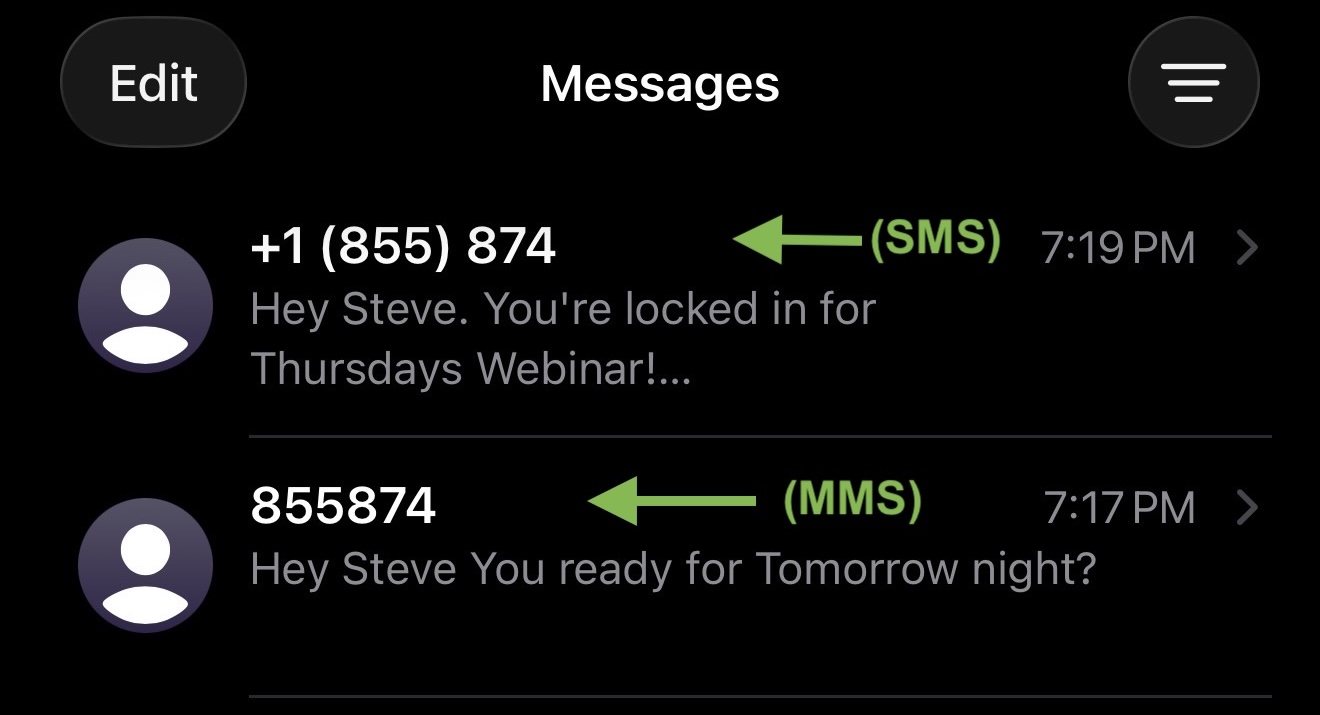
The user sees two separate conversation threads on their phone, both from your Roezan phone number:
Thread A (SMS) - sender shown as
+1 (XXX) XXX-XXXX(with country code)Thread B (MMS) - sender shown as
(XXX) XXX-XXXXorXXX-XXX-XXXX(no country code)
Why this happens
The difference is messages sent as MMS vs. SMS.
Verizon handles SMS and MMS messages differently and can appear as if they came from two different numbers, causing the phone to split them into separate conversation threads.
Note: In Roezan, shorter messages (306 chars or less) are usually sent as SMS, while longer messages (3+ segments) or messages with a picture are automatically sent as MMS.
When a recipient receives both types, their iPhone may place them into separate threads. Android devices generally do not have this issue.
Workarounds
We haver reached out to the carrier requesting this to be updated, but in the meantime here are a few workarounds:
Option 1: Send Messages As Only SMS (simplest)
If you stay under the 3-segment threshold (under ~306 chars), every message goes out as SMS and there's no protocol mismatch for the recipient's carrier to handle. Threading will be consistent across all carriers.
As an alternative here, you could break a long message into two shorter messages
Option 2: Send Messages As Only MMS
If you want all your messages to go as MMS (so they thread together with the long ones), you can attach an image to your shorter messages.
Any message with media attached is automatically sent as MMS, which forces all messages onto the same protocol path and produces consistent threading.
Frequently asked questions
Will my recipient still get both messages?
Yes. Both messages are delivered successfully to the recipient.
They're just shown in two separate threads on the recipient's phone instead of one.
The recipient sees and can reply to both - but the conversation is harder to follow.
Can Roezan fix this on our end?
This is a carrier-side behavior on their network and cannot be controlled from the sending side.
We confirmed that the sender ID is delivered in proper E.164 format and that the reformatting happens after handoff to the carrier.
The only reliable fix is to avoid mixing SMS and MMS in close succession to the same recipient (see options above).
Does this affect Android recipients?
Most Android messaging apps are more forgiving about sender ID formatting and will merge the two threads. The split is primarily an iPhone behavior.
Why does Roezan auto-convert long messages to MMS instead of sending them as multi-part SMS?
A 4 segment SMS gives you 612 characters and costs you 4 credits, whereas with MMS you get 1600 characters for only 3 credits. More bang for your buck.
For accounts that send a lot of long messages, the savings add up significantly.